pip3 install docker-compose
错误信息:
Could not fetch URL https://pypi.org/simple/docker-compose/: There was a problem confirming the ssl certificate: HTTPSConnectionPool(host='pypi.org', port=443): Max retries exceeded with url: /simple/docker-compose/ (Caused by SSLError(SSLEOFError(8, '[SSL: UNEXPECTED_EOF_WHILE_READING] EOF occurred in violation of protocol (_ssl.c:1007)'))) - skipping
ERROR: Could not find a version that satisfies the requirement docker-compose (from versions: none)
ERROR: No matching distribution found for docker-compose
这个错误是在使用 pip 安装 docker-compose 时,因为 SSL 证书验证失败导致的网络连接问题,具体表现为 SSL 握手过程中出现了意外的 EOF(文件结束符),从而无法建立安全的 HTTPS 连接到 PyPI 服务器。
问题原因分析
这个错误通常由以下几种情况导致:
网络环境限制(如公司 / 校园代理、防火墙拦截 HTTPS 流量)
本地 SSL 证书库过期或损坏
Python 的 ssl 模块配置问题
网络不稳定导致连接中断
解决方案
下面提供几种按优先级排序的解决方案,你可以依次尝试:
方案 1:临时跳过 SSL 验证(最简单,适合临时使用)
直接在 pip 命令中添加 --trusted-host 参数跳过 PyPI 的 SSL 验证:
pip install docker-compose --trusted-host pypi.org --trusted-host files.pythonhosted.org
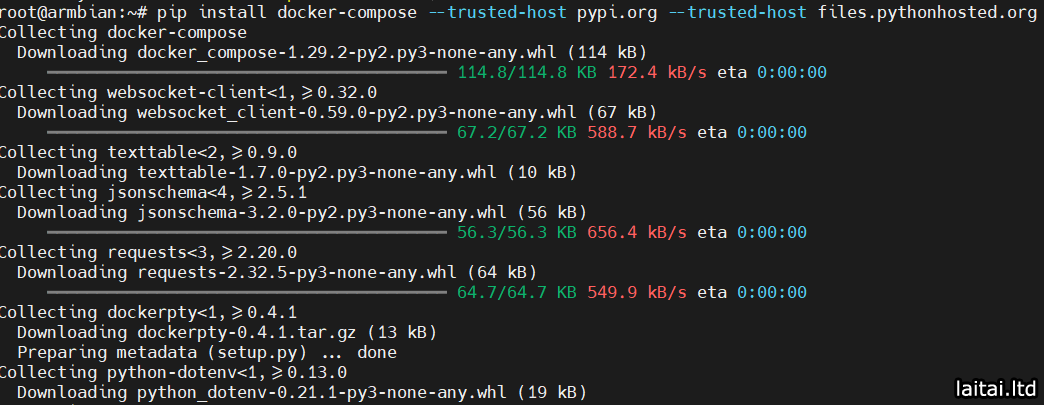
如果你的 pip 版本较旧,也可以使用 --ignore-installed 确保重装,并加上 --no-cache-dir 清除缓存:
pip install --ignore-installed --no-cache-dir docker-compose --trusted-host pypi.org --trusted-host files.pythonhosted.org
方案 2:使用国内 PyPI 镜像源(推荐,更稳定)
国内镜像源通常能避免 SSL 验证问题,同时下载速度更快:
# 使用阿里云镜像
pip install docker-compose -i https://mirrors.aliyun.com/pypi/simple/ --trusted-host mirrors.aliyun.com

# 或使用清华镜像
pip install docker-compose -i https://pypi.tuna.tsinghua.edu.cn/simple/ --trusted-host pypi.tuna.tsinghua.edu.cn
方案 3:永久配置 pip 镜像源(一劳永逸)
创建 / 修改 pip 配置文件,永久使用国内源:
# 创建 pip 配置目录(Linux/Mac)
mkdir -p ~/.config/pip

# 编辑配置文件
vim ~/.config/pip/pip.conf
在配置文件中添加以下内容(使用清华镜像):
[global]
index-url = https://pypi.tuna.tsinghua.edu.cn/simple
trusted-host = pypi.tuna.tsinghua.edu.cn
timeout = 120
Windows 用户则需要在 %APPDATA%\pip\ 目录下创建 pip.ini 文件,内容同上。
方案 4:更新 SSL 相关依赖(针对证书过期问题)
# 更新 certifi 库(管理 SSL 证书的核心库)
pip install --upgrade certifi --trusted-host pypi.org --trusted-host files.pythonhosted.org

# 对于 Debian/Ubuntu 系统,更新系统证书
sudo apt update && sudo apt install -y ca-certificates

# 对于 CentOS/RHEL 系统
sudo yum update -y ca-certificates
验证是否解决问题
安装完成后,执行以下命令验证:
docker-compose --version
如果能正常输出版本号(如 docker-compose version 1.29.2, build 5becea4c),说明问题已解决。
总结一下
临时解决:使用 --trusted-host 参数跳过 SSL 验证,快速安装包。
推荐方案:配置国内 PyPI 镜像源(清华 / 阿里云),既解决 SSL 问题又提升下载速度。
根本解决:更新系统 / Python 的 SSL 证书库,修复证书验证的底层问题。
如果以上方案都无效,大概率是你的网络环境(如代理、VPN)限制了 HTTPS 访问,需要仔细检查网络配置。
